

Tools used
- FigmaScreen design
- SwiftiOS app (SwiftUI)
- Next.jsThe first web app (PWA)
- ClaudePlanning menus (outside the app)
Problem
At the gym, just checking what to do next and at what weight took effort.
Observation
- At the gym you use your phone one-handed with tired arms.
- With the log and the plan in separate places, I went back and forth every time I checked what to do next and at what weight.
- Setting a weight automatically for an exercise with no history produces a number with no basis.
- Apple's built-in iOS apps are careful about where settings go and which items to show.
Storing reps as text like "8–10" made it impossible to tell whether a set was completed. Reps are stored as a lower and upper number.
Flow
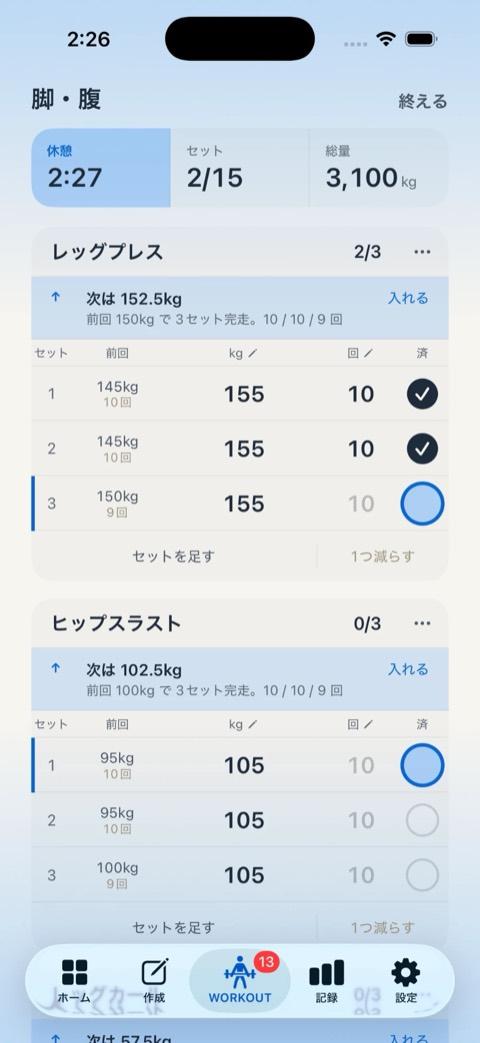
On the Today screen, there is always exactly one thing to tap. Your last session sits right next to the input fields.
Screens
Today
Always one. For each state, exactly one next action appears.
Set table
Next to the inputs. Enter weight and reps while comparing with last time.

Create a plan
AI stays outside the app. Plan with Claude, then paste the JSON it gives you.
Decisions
- No AI inside the appSo your log is never sent anywhere. Plans come from Claude and get pasted in.
- Reps as a numeric rangeAs text, there's no way to tell whether you hit it.
- No auto weight for exercises without historyNo numbers without a basis. When it does pick a weight, it gives a one-line reason.
Result & lesson
I released the web version (PWA) in August 2026, then moved it to iOS with SwiftUI. I use it at every workout.
Studying Apple's own apps taught me where settings belong and how to choose what to show. I used that when I reworked Shukatsu Hub's screens.
TechSwiftUI (iOS 26), Swift 6, Next.js (web version)
LinksOpen the web version ↗Main app is private
Other work